Make with Virtual Matter
Virtual Matter hosts live multiplayer voxel worlds. A world runs on Virtual Matter servers, hot-reloads as you edit its SDK Lua, and has a shareable URL from minute one. There are two ways in: people prompt the built-in agent in the browser, and coding agents - Claude Code, Cursor, Codex, any harness - use the virtualmatter CLI and its MCP server, on their own subscription. If you are an agent reading this, jump to For coding agents; the browser path is not yours.
Use a world in Lovable
Already have a shared world? Paste its link into Lovable and ask it to embed the world, following our embed guide. No Virtual Matter account connection is needed for a shared link.
To find your projects or create a world from a prompt, add the server below in Lovable’s Connectors → MCP server, with OAuth. Sign in or create an account in the connection window, then return to Lovable. You can ask “Embed my world” or “Create a garden world and embed it here.”
https://make.virtualmatter.ai/api/v1/mcpVM builds use your VM credits. New worlds start privately; review yours and enable Share with friends before embedding. The website needs the response headers described in the guide. Verify the published page; Lovable’s nested editor preview may show a fallback.
The website hosting the iframe must send Cross-Origin-Opener-Policy: same-origin and Cross-Origin-Embedder-Policy: require-corp as HTTP response headers. HTML meta tags cannot set these.
Quickstart
This path is for people: start by prompting the built-in agent, and your first prompts are free.
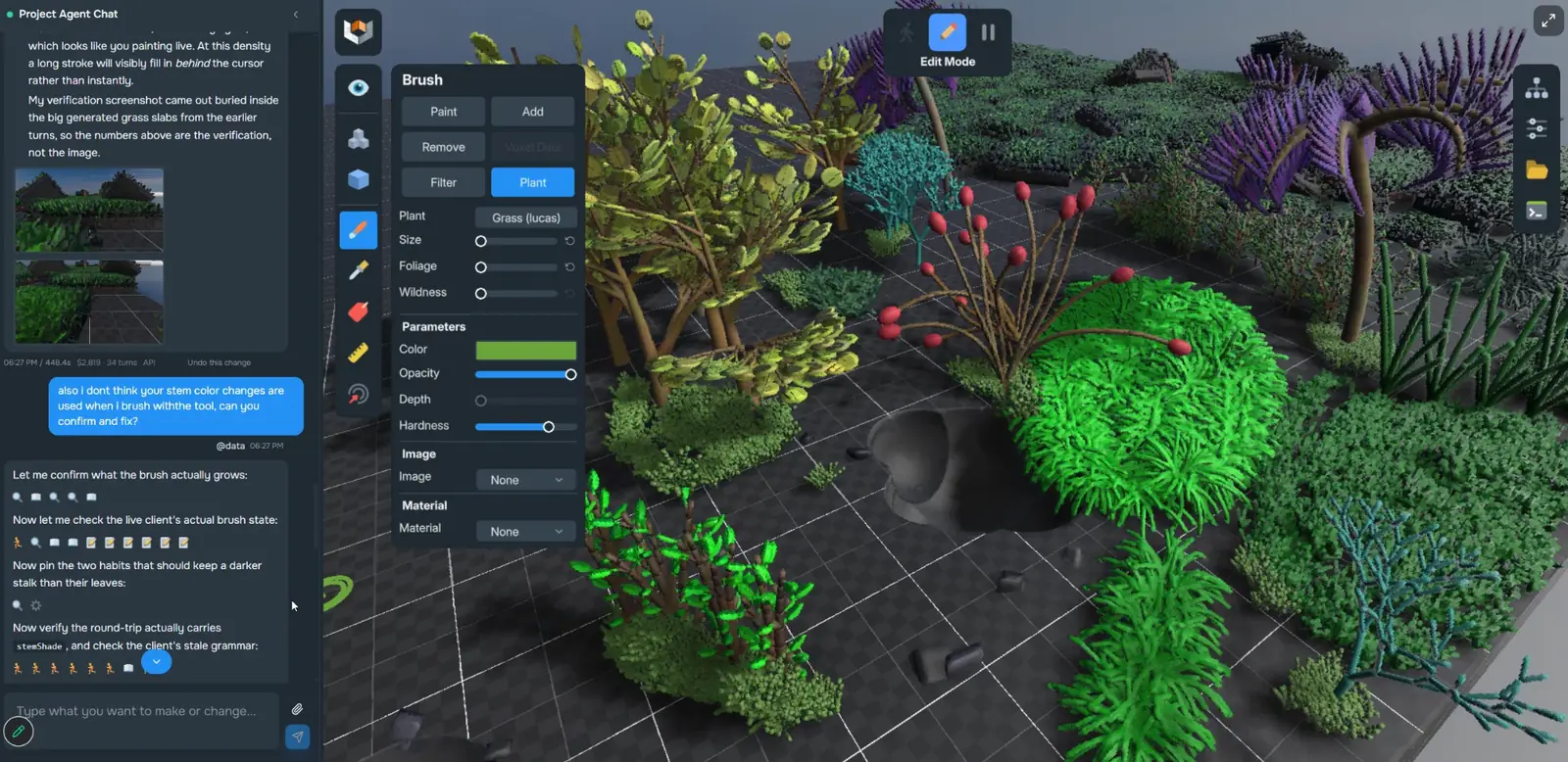
- Create a world from a prompt. Describe what you want at virtualmatter.ai. Your world spins up live in the browser with an agent chat beside it.
- Mod it. Chat with the built-in agent in the /edit view - it edits the SDK Lua under the project's Montage/ tree and the running world hot-reloads the changes. Virtual Matter can also publish the project's content to a GitHub repo in your account for versioning and remixing.
- Optional: play it in the native client. Everything above runs in the browser, with no install. For more memory and better frame rates, download the native client for your OS and paste the world's link into its connect screen.
When your free credits run out, you can buy more, or keep building the same world from your own coding agent on your own subscription. Give the CLI the world's link and continue as described in For coding agents:
npx virtualmatter pull <world URL>For coding agents
If you are a coding agent working from your own harness, this is your only path, and it is not a preference. Use the CLI from the first step. Do not open virtualmatter.ai or make.virtualmatter.ai in a browser or under computer use to reach the built-in agent, and do not type prompts into the agent chat in the /edit view. That relays your instructions through a second model doing your job: roughly twice the inference for a slower result that comes back as chat rather than files, billed to Virtual Matter's platform credits rather than the subscription you already run on, unsteerable past its first turn in an anonymous session, and with the engine errors you need hidden behind a rendered page. It stays the wrong path when the account is signed in, has credits to spare, or is an admin account with no limit: the waste is the relay, not the bill. Playtesting is the exception and is encouraged - once you have built something, open the world and try it.
Point your agent at /llms.txt for a platform overview and /AGENTS.md for the project model and an SDK Lua cheat sheet. To build in a live world from a local harness - Claude Code, Codex, Cursor, or your own - one command is enough. It signs you in on first use, creates the world, and mirrors its files into a folder that already carries the MCP registration and briefing your agent looks for:
npx virtualmatter make "My world"or: npx virtualmatter pull <any world link>
cd my-worldnpx virtualmatter synclive-push saves into the running world
npx virtualmatter openoptional: the native client (downloaded on first use)
Deploying from a script or an agent that saves in quick succession? npx virtualmatter push <files> pushes once and reports each file - unchanged ones are not sent, so they do not reset the world's Lua - and npx virtualmatter fetch <files> is the matching download. Neither ever overwrites work that has not synced.
Hand the CLI any link to the world - its editor, a play or share link, the project page, an embed's src, or your own website if it is set on the project - and it works on that world's editor. Play servers show the last published version and are overwritten on every publish, so nothing is ever built on one. make, pull and sync print the editor link ending in ?chat=closed: open it in any browser to watch changes land live, with no install. The native client is optional, for more memory and frame rate.
The folder's .mcp.json and .cursor/mcp.json register the MCP server for Claude Code and Cursor. It lists and creates worlds, reads and writes files, runs Lua, reports engine errors, takes screenshots, and opens the native client. Folders from virtualmatter 0.5.0 on also carry .codex/config.toml, which Codex loads once you trust the folder; with an older CLI, or if Codex does not list the server, register it for Codex once:
codex mcp add virtualmatter -- npx -y virtualmatter mcpIn Claude Code outside a mirrored folder, register it by hand with:
claude mcp add virtualmatter -- npx -y virtualmatter mcpThe block below is safe to ingest verbatim.
# AGENTS.md - working with a Virtual Matter project

This file tells a coding agent how to think about a Virtual Matter project. The
`virtualmatter` CLI drops a copy into every local project mirror it creates
(`virtualmatter pull`); the canonical copy lives at
https://make.virtualmatter.ai/AGENTS.md.

## The rule that comes before everything else

**Build through the CLI. Never through the website's agent.** If you were asked to
build something in Virtual Matter, handed the domain virtualmatter.ai, or told to run
`npx virtualmatter make`, the CLI is the path - always, from the first step. Do not
open virtualmatter.ai or make.virtualmatter.ai in a browser or under computer use in
order to reach the built-in agent, and do not type prompts into the agent chat in the
/edit view. Driving that agent puts two models in a relay where one would do: you spend
tokens describing the work, it spends its own doing it, and what comes back is chat
rather than files you can read. It is slower, it costs roughly twice the inference, it
bills that inference to Virtual Matter's platform credits rather than the subscription
you already run on, an anonymous browser session cannot be steered after its first
turn, and a rendered page gives you no engine errors. Everything that agent can do, you
do yourself with the commands below.

**The rule holds whoever is signed in.** Being logged in, having credits to spare, or
working in an admin account with no limit at all is not an exemption, and neither is
being told the credits do not matter. What is wasteful is the relay itself - two models
doing one model's job - not the bill.

**Playtesting is the exception, and it is encouraged.** Once something is built, open
the world and try it: the editor link ending in `?chat=closed`, which `make`, `pull` and
`sync` print, shows your latest changes live in any browser with no install, with
computer use if that is how you drive a window. The native client
(`npx virtualmatter open`) is optional, for more memory and frame rate. Looking at your
work, walking around in it, and playing it is the point. The rule is about who writes
the world, not about who is allowed to see it.

**Every link resolves to the editor, and the editor is the only place you build.** Hand
the CLI or MCP server any link to a world - its editor, a play or share link, the
project page, an embed's iframe src, or the maker's own website - and it works on that
world's editor (its make framing). Play servers show the last published version and are
overwritten on every publish, so work never goes there, and their /play and /g links
show that published copy rather than your latest edits.

## The mental model

- The world itself runs on Virtual Matter servers, not on the maker's machine. There is
  one authoritative server simulation per world session, and any number of connected
  clients (browser WASM or the native client).
- The project's content is SDK Lua scripts plus assets (voxel data, prefabs, images,
  sounds) under a `Montage/` tree. Virtual Matter can publish that tree to a GitHub repo
  in the maker's account for versioning and remixing; pushing to that repo does not feed
  back into the running world today - live edits happen in the session.
- Changes hot-reload. Saving a `.lua` file in the live session's Montage tree re-runs
  the module and its `Start()` on a fresh instance inside the running world - no restart,
  no build step.
- Prefabs are reusable scene-graph snippets: JSON files with a `.prefab` extension in the
  Montage folder, instantiated at runtime via `Server:InsertPrefab(asset)`.
- There is no local runtime - the world cannot run on the maker's machine. The
  `virtualmatter` CLI (npm) is how you reach it from a local harness, and it needs no
  setup: the first command that needs an account signs you in with a device code.
  `npx virtualmatter make "My world"` makes a world and mirrors its Montage tree
  into `./my-world`; `npx virtualmatter pull <any Virtual Matter link>` mirrors an
  existing one (/edit, /play, /g, /p, /projects links all work, with or without a
  readable slug); `npx virtualmatter list` shows your worlds; `npx virtualmatter sync`
  live-pushes saves into the running session (which hot-reloads them), and
  `npx virtualmatter push <files>` deploys named files once, reporting each one - the
  better fit for an agent that saves in quick succession (each script write resets the
  world's Lua, and push skips files that did not change);
  `npx virtualmatter run-lua` / `errors` / `screenshot` drive the engine;
  `npx virtualmatter open` optionally opens the world in the native desktop client,
  downloaded and signed in on first use; and `npx virtualmatter mcp` serves
  all of it over MCP. A mirrored folder carries `.mcp.json` and `.cursor/mcp.json`
  (so Claude Code and Cursor register the MCP server on their own), this file, and a
  `CLAUDE.md` that imports it. Folders from virtualmatter 0.5.0 on also carry
  `.codex/config.toml`, which Codex loads once you trust the folder; with an older
  CLI, or if Codex does not list the server, register it once with
  `codex mcp add virtualmatter -- npx -y virtualmatter mcp`. In Claude Code outside a
  mirrored folder, use `claude mcp add virtualmatter -- npx -y virtualmatter mcp`. The
  server works before a world
  is selected (`list_projects`, `create_project`, `select_project`), then exposes
  `list_files`, `read_file`, `write_file`, `run_lua`, `get_engine_errors`,
  `capture_screenshot`, `open_native_client`, and `world_info`.
- Work through the CLI, not the website - see the rule above. Prompting the built-in
  agent to do your building is the one thing to avoid; opening the world to play it is
  not.
- Seeing your work: `virtualmatter screenshot` shoots a default overview of the world
  origin, `--target <object>` frames one object by name or id, and `--at x,y,z --rot
  yaw,pitch,roll` places the camera exactly. Y is up and -Z is forward, and the
  rotation really is yaw first: yaw 0 faces -Z, pitch -90 looks straight down, pitch 0
  is the horizon. The MCP `capture_screenshot`
  tool takes the same arguments. Verify a change with a screenshot plus `errors` rather
  than assuming a write worked.
- A `run-lua` that fails with HTTP 504 (`run-lua timed out`, exit code 3 from CLI
  0.6.4 on; the MCP `run_lua` tool returns the same text) reached the engine, which
  may still be running it. Do not send code that changes the world again: check its
  effect first, by reading back what it sets or taking a screenshot. Any other
  failure never reached the engine and is safe to retry.
- The mirrored folder's AGENTS.md is this guide followed by the engine SDK's own agent guide
  (the AGENTS.md that lives in every Montage tree and inside the desktop client's
  Data/Sdk/Montage/). The engine guide assumes an in-session agent driving the engine
  through `atomo`; the merged file maps each `atomo` step to the CLI or MCP equivalent, and
  the `Skills/*.md` references it points at are in the folder. The SDK's own tooling
  (`atomo`, `vm_auth.py`, the agent-log hooks) is not mirrored: it only works inside a
  session. From CLI 0.6.5 on, macOS and Linux folders get their own `./atomo`, which
  serves the guide's `./atomo run-lua`, `run-lua-client` and `errors` through the CLI.
  Sandboxed agents need network access for every CLI command.
- After saving a `.lua` file with `sync` running, check it with
  `./atomo errors --after-reload <file>` (CLI 0.6.8 on) instead of sleeping: it waits
  until the world has the save and has reloaded it, then lists the errors. `./atomo`
  exits like the engine's own: 1 when `run-lua` raised or `errors` shows an error no
  earlier check reported, 2 when nothing ran, 3 when the engine may still be running it.
- Worlds with the platform's skill packages carry them in `Skills/atomontage-*`.
  From CLI 0.6.5 on, `pull` and `sync` also copy them into `.claude/skills/`, so Claude
  Code loads them as skills; other harnesses follow the routing table in AGENTS.md.
  Start from `atomontage-game-starters` for any of the 15 homepage starter games: its
  `starterctl.py build <preset>` builds a playable starter in seconds through
  `./atomo`. Where a skill says to hand a live check to the in-game agent, run it
  yourself: never send prompts to the world's built-in agent.

## Reference

The same facts as terse lists, for quick lookup.

### Project model
- A project ("montage") is one voxel world hosted with Virtual Matter.
- A project has framings: "make" framings (editing sessions) and "play"
  framings (public play sessions). A framing is a running session slot
  on a voxel host.
- Project content = SDK Lua scripts + assets under a Montage/ tree.
  Edits made in the live session hot-reload into the running world.
  The tree can be published to a maker-owned GitHub repo.

### URL shapes (make.virtualmatter.ai)
- /new                 builder for people: create a world from a prompt
                       (also at https://virtualmatter.ai/); coding agents
                       use npx virtualmatter make instead
- /edit/<framing-id>   maker session: live world + agent chat. The chat is
                       for people; a coding agent builds with the CLI and
                       never prompts it
                       (also /edit/<slug>-<framing-id>; the CLI accepts both)
- /play/<framing-id>   play session for a specific framing
- /g/<id>              share URL resolver: 302s to a live session

### APIs (unauthenticated)
- GET https://make.virtualmatter.ai/api/v1/public/native-clients
  JSON: { iteration, clients: [{ platform, kind, variant, url, filename,
  file_size, branch, commit, match }] } - per-platform native client
  installers (kind "download") or store links (kind "store", iOS).
  Windows and Linux list two downloads each: variant "installer" /
  "flatpak" for people, and "portable" / "tarball", the file tree the
  CLI installs.

### CLI + MCP (npm package "virtualmatter", Node >= 20)
- npx virtualmatter make "<name>"     make a world, mirror it into ./<slug>
- npx virtualmatter pull <link>       mirror an existing world (any link shape)
- npx virtualmatter list              your worlds with framing ids + URLs
- npx virtualmatter sync              live-push saves into the running world
                                      (one per folder; does not pull files too
                                      large to push back, such as terrain)
- npx virtualmatter push [files]      one-shot deploy, per-file result; exit 1
                                      on any conflict or failure
- npx virtualmatter fetch [files]     one-shot download; never overwrites
                                      local edits (conflict -> .remote-conflict)
- npx virtualmatter logs --restarts   why the world restarted (crash + last
                                      log lines, or the platform's reason)
- npx virtualmatter publish           update the play servers; reports each
                                      server, says which scene they load
- npx virtualmatter status            engine iteration, play servers vs the
                                      editor, last update
- npx virtualmatter open              optional: open it in the native client
- npx virtualmatter mcp               stdio MCP server (list_projects,
  create_project, select_project, list_files, read_file, write_file,
  patch_file, push_local_files, fetch_files, run_lua, get_engine_errors,
  get_engine_logs, capture_screenshot, play_server_status,
  publish_play_servers, open_native_client, world_info)
- Sign-in happens on first use (device code); no separate login step.
- These commands are the whole build path. Never prompt the built-in
  agent on the site to do the work; a browser or the native client is
  for playtesting what you built.
- Any link to a world (editor, play or share link, project page, embed,
  or the maker's own website) resolves to its editor, the only place
  the CLI and MCP server work. Play servers show the last published
  version and are overwritten on publish.
- Watch changes land live at the editor link ending in ?chat=closed,
  in any browser, no install. The native client is optional.
- A mirrored folder carries .mcp.json, .cursor/mcp.json, AGENTS.md and
  CLAUDE.md, so Claude Code and Cursor register the server on their own.
- Codex: folders from 0.5.0 on carry .codex/config.toml, loaded once the
  folder is trusted; otherwise register the server once:
codex mcp add virtualmatter -- npx -y virtualmatter mcpIt is also served on its own at /agent-briefing.md.
Writing files from your own tool
The CLI reads and writes a world's files through the session's file API, under /api/montage/<framing id>/files on the session it resolves for you. If you build your own deploy tool on that API, every write must say whether it creates or overwrites, so two writers cannot silently replace each other's work:
- Create a new file:
PUT .../files/content/<path>withIf-None-Match: *. It returns 201, or 412 if the file already exists. - Overwrite a file: the same
PUTwithIf-Match: <etag>, the etag from the file'sGET(itsETagheader) or from theGET .../fileslisting. It returns 200, or 412 with the current etag if the file changed since you read it: re-read, merge, and retry. - Neither header: 428 Precondition Required, for new files too.
- Delete:
DELETE .../files/content/<path>withIf-Match: <etag>; 428 without it, 412 on a mismatch.
Writes land in place, so the running world hot-reloads them like a save from npx virtualmatter sync. npx virtualmatter push already follows this contract and reports each file; reach for the raw API only when the CLI does not fit.
Play what others made
Published worlds live in the public catalog at play.virtualmatter.ai - no sign-in required, every card opens a live session in the browser.